


Interactive experiences for therapeutic patient education
A birthday party, a meal, a familiar situation: ScenaCare provides interactive activities for therapeutic patient education sessions. Patients explore, make choices and explain their perspective. You use those conversations to work towards the session's learning objective.
Let's discuss your workshop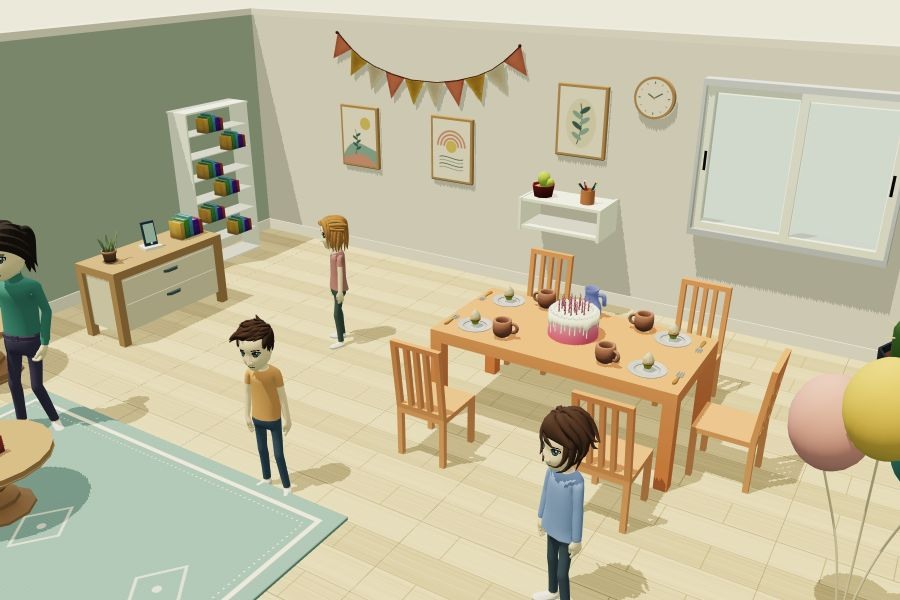
Who is it for? Patient education teams, hospitals, patient organisations and professionals who facilitate education sessions.
A starting point for patients' questions
A broad question can be a difficult starting point in a patient education workshop. A scene offers something specific: an object to observe, a habit to discuss or a decision to explain. Ask what stands out or how things work at home, then give the group time to compare perspectives.
The platform runs in a browser. In an individual session, the patient and professional can explore the activity together. With a group, projecting a scene allows everyone to discuss the choices. The digital activity becomes part of the patient education programme run by your team.
Preparing and facilitating a session
Start with a learning objective
Choose what you want to explore with patients: an everyday situation, a belief or a recurring question. Then select an activity that fits.
Explore and put things into words
Let participants observe and suggest choices. Pause the exploration, return to a detail and invite people to explain their reasoning.
Connect the scene to everyday life
Revisit the questions raised and the points discussed in your session. A quiz or another situation can continue the conversation and help participants explain what they have taken away.
An example workshop about asthma
In The birthday party, participants discover a familiar social setting and its surroundings. The scenario starts a conversation about asthma with a professional. Try the scene to see how observation and choices can prompt discussion, then prepare the questions you want to ask your group.
Open the experienceBuild a sequence of activities
One experience can bring together several rooms or activities: explore a scene, answer questions, then revisit a situation. Keep a common learning thread and choose what your session needs without opening a separate link for every activity.
The professional guides the session and helps interpret the discussion. To prepare your first use, we can explore an example with you, check your equipment and discuss content adaptations.
Let's start with your workshop
Explore an example with us and discuss what your team needs to adapt.
Request a demo